Table of Contents
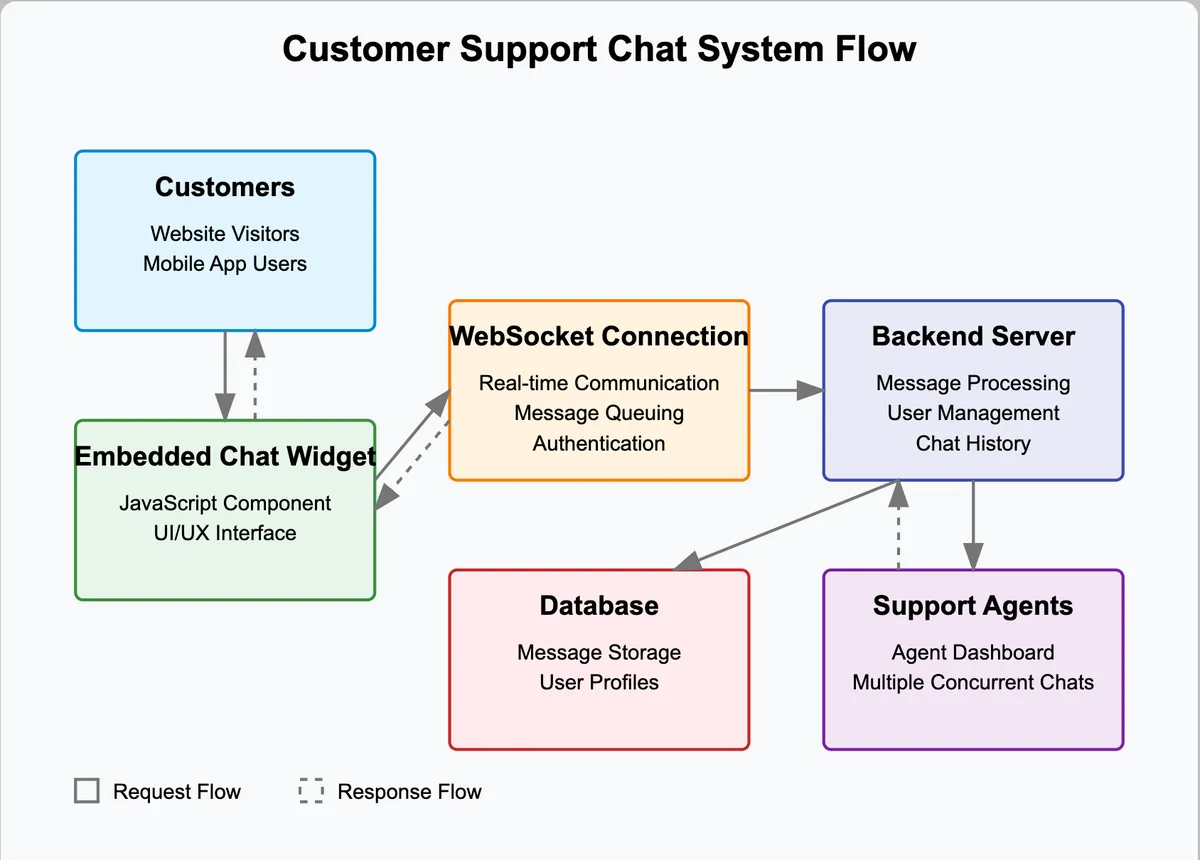
This tutorial is for django developers who are comfortable with the primitives and want to build real time applications using django + channels. We’ll be building a minimal intercom clone(backend only) to simulate chat support provided to client websites who embed our widget for website visitors as illustrated
Introduction
Real time systems differ from traditional systems by the constraint of response time - typically they need to respond to changes in state immediately or within a guaranteed time frame, often dictated by the system’s operation requirements. Unlike traditional request-response systems, real time systems prioritise timely and predictable execution, often at the expense of throughput or flexibility. For ex in a ticket booking website like Ticketmaster, the typical request-response flow comprises of fetching all the available tickets for the user’s search criteria, booking them etc, all of which can tolerate brief delays. Contrast it with a real time system like a trading app where trades have to be executed immediately as soon as a request is made and execution time is a governing factor in the quality and success of this service.
For this tutorial, we’ll build a very basic intercom clone backend that allows website admins to talk to the visitors. At the end I hope you will have a solid understanding of how to mold django to handle real time services on top of a traditional request-response architecture. Let’s dive in by setting up a basic django project-
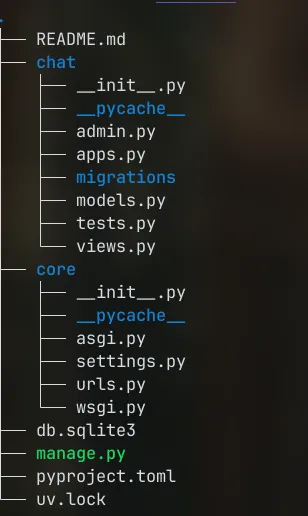
We have initialized the chat app which will take care of our real time chatting functionality using django channels. Let’s go ahead and install the requisite packages using uv
uv add channels[daphne]
But what is this package anyway and how does it help implement real time functionality? Let’s discuss that after visiting some important concepts-
Concepts
asgi
Firstly, we need a new webserver for handling the websocket connections since traditional wsgi servers like gunicorn can’t. We’ll add daphne which is an excellent asgi server to our INSTALLED_APPS and it takes over the runserver command enabling websocket connections / async views in dev mode. Also, asgi servers can handle both http and ws protocols so we won’t need separate servers which is neat (ASGI is a standard for Python asynchronous web apps and servers to communicate with each other, and positioned as an asynchronous successor to WSGI. It can handle both synchronous / asynchronous views along with the websockets protocol. You can read more at asgi).
INSTALLED_APPS = [
    "daphne",
    "chat",
    "django.contrib.admin",
    "django.contrib.auth",
    "django.contrib.contenttypes",
    "django.contrib.sessions",
    "django.contrib.messages",
    "django.contrib.staticfiles",
]
Let’s run the dev server with python manage.py runserver
Watching for file changes with StatReloader
Performing system checks...

System check identified no issues (0 silenced).
April 09, 2025 - 15:22:58
Django version 4.2, using settings 'core.settings'
Starting ASGI/Daphne version 4.1.2 development server at http://127.0.0.1:8000/
Quit the server with CONTROL-C.
As you can see now daphne is listening for http/ websocket connections and supports async request handling in dev mode itself.
Websockets
Websockets are the underlying OS constructs that allow this bi directional flow of information via long running connections. These are built on top of operating system sockets and leveraged to allow communication between different processes and machines.
A websocket connection (ws://) starts off as a normal http connection which is then upgraded to a bidirectional long running connection. You can see this upgrade in the server logs, along with websocket connection events-
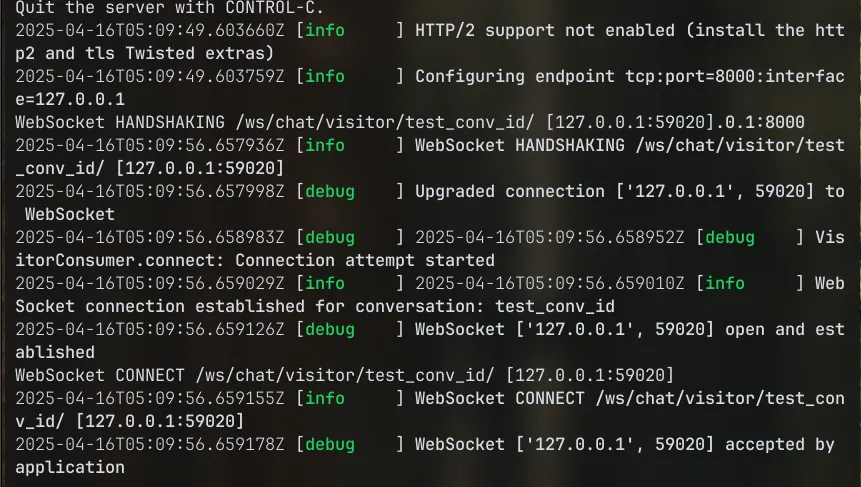
Note: For production you would use the wss:// protocol which is secure, TLS encrypted counterpart to ws:// (like HTTPS is to HTTP).
Channel
In computing, a channel is a model for interprocess communication and synchronization via message passing. A message may be sent over a channel, and another process or thread is able to receive messages sent over a channel it has a reference to, as a stream. Different implementations of channels may be buffered or not, and either synchronous or asynchronous.^1^
Implementation
Let’s start implementing the chat application as we would any other django application with its own routes / models/ views etc. Primarily there are two kinds of users - agents and visitors. (We also have in built superusers that can overlook the entire system with django admin if needed). In the most minimal implementation, the models can look like the follows-
#chat/models.py
from django.contrib.auth.models import User
from django.db import models

class Visitor(models.Model):
    id = models.UUIDField(primary_key=True, default=uuid.uuid4, editable=False)
    email = models.EmailField(blank=True, null=True)
    name = models.CharField(max_length=100, blank=True, null=True)
    first_seen = models.DateTimeField(auto_now_add=True)
    last_seen = models.DateTimeField(auto_now=True)

    def __str__(self):
        return (f"Visitor: {self.name or self.email or self.id}")

class Agent(models.Model):
    user = models.OneToOneField(User, on_delete=models.CASCADE, related_name='agent_profile')
    is_online = models.BooleanField(default=False)
    display_name = models.CharField(max_length=100, blank=True, null=True)

    def __str__(self):
        return f"Agent: {self.user.username}"

    @property
    def name(self):
        return self.display_name or self.user.get_full_name() or self.user.username
We can also have the Conversation and Message models as reference to understand how channels / async route handlers may have to deal with data persistence as part of business logic.
With the models out of the way, we also have to make routing arrangements for the chatting functionality. As mentioned previously, the websocket protocol actually starts off as http but is then upgraded to ws protocol which is a continuous running connection so as to avoid the (TCP) overhead of opening a new connection for each request. To that end, we need to configure our asgi application to handle both http and ws requests. Django channels provides just the needed methods to provision the same. Let’s modify our core/asgi.py:
#core/asgi.py

import os
from django.core.asgi import get_asgi_application
from channels.routing import ProtocolTypeRouter, URLRouter
from channels.auth import AuthMiddlewareStack
import chat.routing

os.environ.setdefault("DJANGO_SETTINGS_MODULE", "core.settings")

application = ProtocolTypeRouter(
    {
        "http": get_asgi_application(),
        "websocket": AuthMiddlewareStack(URLRouter(chat.routing.websocket_urlpatterns)),
    }
)
Since django channels is tightly coupled with django (maintained by the same project as django web framework), it can be easily patch into django core functionality like auth, url routing etc out of the box. One example of this is evident in the code above where AuthMiddlewareStack actually takes care of the authentication using existing/familiar django primitives.
But what’s chat.routing? By definition, the chat routes should be separated from the REST endpoint routes because of the need for a different kind of connection. We’ll thus define them in chat/routing.py
# chat/routing.py
from django.urls import re_path
from . import consumers

websocket_urlpatterns = [
    re_path(
        r"ws/chat/visitor/(?P<conversation_id>[^/]+)/$",
        consumers.VisitorConsumer.as_asgi(),
    ),
    re_path(
        r"ws/chat/agent/(?P<conversation_id>[^/]+)/$",
        consumers.AgentConsumer.as_asgi(),
    ),
]
Note that websocket_urlpatterns is imported into core/asgi.py to create the composite application with ProtocolTypeRouter. Also note the use of re_path in place of path (due to a limitation in nested routes in the URLRouter).
Let’s move on to implementing the core functionality of chats between different kinds of users. The python package channels provides the Channel interface that is the common interface between different consumers that push the relevant messages forward to whatever clients that are subscribed. Before we can use it, we have to set up the CHANNELS_LAYERS to our settings. For our example we can use the in memory channels store that exposes this message queue to us in order to listen to websocket events and transmit data. Here’s how it’s configured
# settings.py

CHANNEL_LAYERS = {
    'default': {
        'BACKEND': 'channels.layers.InMemoryChannelLayer',
    },
}
Channels is basically an abstraction layer built on top of a pub/sub architecture - it keeps track of which clients are connected to the websocket and where to deliver messages.
Note: InMemoryChannelLayer is only suitable for development or single-process deployments. For production, use RedisChannelLayer by setting “BACKEND”: “channels_redis.core.RedisChannelLayer” and configuring a Redis instance.
Chat
To setup the chat we need to do more than a few things. Firstly, we need to create websocket endpoints for both agents and visitors.
So far we have the chat app with the resident models which we’ll use to persist the chat. One might argue that we don’t need sockets at all - chatting can be implemented with POST api requests to something like POST /conversation/message. Which is technically correct but it’s not real time - for every chat message a new TCP connection needs to be opened creating an overhead on top of the network + other delays and thus it’s not real time, at least relative to websockets. On the other hand, channels uses websockets to open up long running, bi directional connections to clients and thus real time chat is possible on the persistent connection.
Since this app is decidedly real time, we must now talk in terms of events - there are some events that are going to be common to all kinds of real time functionality users. For every stakeholder who wants to chat - they have to connect to the system and disconnect when desired. And just like that, we have discussed 2 of the 3 main events that constitute a websocket connection - connect and disconnect. The final event is receive which basically is a kind of a super event that takes care of all the business / domain logic - you could send different kinds of messages (in our case they are - text messages between admin and visitor, but they could be of other types like typing indicators etc). To facilitate this, django channels provides abstraction called Consumers. In the future you might want to add read receipts, auto reply etc. - all of which will be built on this foundation of consumers.receive function.
Consumers
Consumers are the real time counterpart to django REST api views. Just like django views map to urls then patched into urlpatterns, so do consumers with their own urlpatterns as seen in routing.py.
A chat consumer essentially wraps up the websocket api to provide an interface for when clients connect, disconnect and send messages. In this example, in the receive function we get the raw text string, convert it to json and send it back to the connected client (this is the idiomatic way and sending it back to the client is actually optional).
Here’s what a basic synchronous Consumer interface looks like -
class ChatConsumer(AsyncWebsocketConsumer):
    async def connect(self):
        await self.accept()

    async def disconnect(self, close_code):
        # do cleanup or something
        pass

    async def receive(self, text_data):
        text_data_json = json.loads(text_data)
        message = text_data_json["message"]

        await self.send(text_data=json.dumps({"message": message}))
Let’s look at the desired chatting flow in detail-
- Client generates a conversation id and connects to websocket consumer; waits for agent
- A group is created with this conversation id and it is added to the pool of available conversation groups
- Agent chooses a conversation id from a pool of ids
- Agent joins the same conversation via the room via its own endpoint
Every client that’s connected to websocket server is served by its own instance of the consumer. Since each connection maintains its own state and coroutine, it could lead to high memory usage under load, which should be considered in production.
Let’s start implementing the chat consumers one by one-
class VisitorConsumer(AsyncWebsocketConsumer):
    async def connect(self):
        # Extract the conversation id from the routing url
        self.conversation_id = self.scope["url_route"]["kwargs"]["conversation_id"]
        # Create and join a group based on the conversation name for agents to join
        self.conversation_group_name = f"chat_{self.conversation_id}"
        await self.channel_layer.group_add(
            self.conversation_group_name, self.channel_name
        )

        await self.accept()

        # add to conversation pool
        add_to_available_pool(self.conversation_id)

    async def disconnect(self, close_code):
        # Leave room group
        await self.channel_layer.group_discard(
            self.conversation_group_name, self.channel_name
        )
The code follows the exact flow described above. Here are the similar methods for AgentConsumer:
class AgentConsumer(AsyncWebsocketConsumer):
    async def connect(self):
        self.conversation_id = self.scope["url_route"]["kwargs"]["conversation_id"]
        self.conversation_group_name = f"chat_{self.conversation_id}"

        # Join room group
        await self.channel_layer.group_add(
            self.conversation_group_name, self.channel_name
        )
        await self.accept()

        # remove this conversation from the pool
        remove_from_available_pool(self.conversation_id)

    async def disconnect(self, close_code):
        # Leave room group
        await self.channel_layer.group_discard(
            self.conversation_group_name, self.channel_name
        )
Note that once an agent finishes connecting, the conversation id is removed from the list of ids in the availability pool. The disconnect method is idiomatic and just removes the client from the group. Eventually if both the visitor / agent clients disconnect from a channel group, the group practically vanishes (no manual cleanup needed).
Messaging
The only remaining method to implement is the receive method where most of the chatting magic happens. Let’s implement receive for VisitorConsumer:
class VisitorConsumer(AsyncWebsocketConsumer):
  # .. connect, disconnect .. #

    async def receive(self, text_data):
        """
        Handles incoming JSON messages.
        Expects:
        {
            "type": "chat.message" | "typing" | "identify" | ...
            "content": { ... }
        }
        """
        content = json.loads(text_data)
        msg_type = content.get("type")
        msg_content = content.get("content", {})


        if msg_type == "chat.message":
            await self.channel_layer.group_send(
                self.conversation_group_name,
                {
                    "type": "chat_message",
                    "sender": "visitor",
                    "message": msg_content.get("message", ""),
                },
            )

        elif msg_type == "typing":
            await self.channel_layer.group_send(
                self.conversation_group_name,
                {"type": "typing_event", "sender": "visitor"},
            )

        else:
            logger.warning(f"Unknown message type received: {msg_type}")

    # Handlers for group messages
    async def chat_message(self, event):
        await self.send(
            text_data=json.dumps(
                {
                    "type": "chat.message",
                    "sender": event["sender"],
                    "message": event["message"],
                }
            )
        )

    async def typing_event(self, event):
        await self.send(
            text_data=json.dumps({"type": "typing", "sender": event["sender"]})
        )
This method basically receives messages that aren’t connect/disconnect events, which is why this method can act as a router to handle different kinds of messages. As mentioned already, the messages can be of any type as per the business logic requirements - for ex. chat messages, typing indicator messages (indicating the user is typing), identification etc. At its core, the receive method just parses the message string, identifies the type of message and handles it accordingly. In the case of chat messages, the event is published to the relevant group with group_send, where the channels layer makes sure to deliver it to all the clients connected to the group. The low level interface provided for this is the self.send() function that forwards the message to each connected client (If there were no groups, the message would just go to the client connected to the current instance of the consumer). A similar implementation is provided for Agent consumer that handles same message types, only with the sender key set to agent in the receive method.
Here’ the chat message flow for reference:
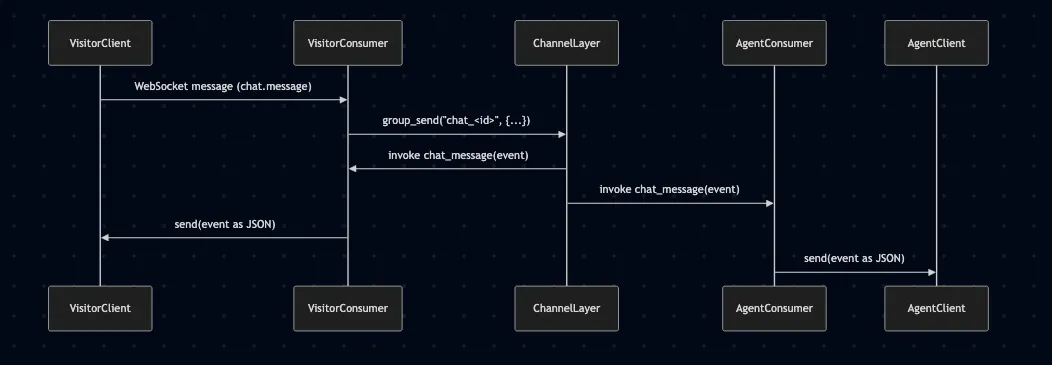
Note how a message that originates in the visitor finds its way back to them (called echo message). This is a design pattern and can be disabled
by clearing the self.send() call in VisitorConsumer. Also, channels automatically looks for a method named my_method for a message of type my.method published to the group, and that’s how chat.message gets routed to chat_message method.
You can also call business logic methods, like saving a chat message to database, assigning to Conversations, right here after handling the message flow.
And that wraps up the implementation. Let’s test everything!
Testing
Let’s test our backend by simulating client connections to our websocket server interface. I’m going to use the websockets package to simulate browser clients in python to see everything in action (with the added benefit of not leaving the terminal for the browser). Here’s the code for a basic client that simulates clients for both agents and visitors and haves them communicate on a hard coded conversation id.
# chat_client.py

import asyncio
import websockets
import json
import sys

# Constants
BASE_WS_URL = "ws://localhost:8000/ws/chat"
CONVERSATION_ID = "test_conv_id"  # Hardcoded conversation ID


def make_payload(event_type, content=None):
    return json.dumps({"type": event_type, "content": content or ""})


async def chat_loop(role: str):
    ws_url = f"{BASE_WS_URL}/{role}/{CONVERSATION_ID}/"
    async with websockets.connect(ws_url) as ws:
        print(f"[{role.upper()}] connected to {ws_url}")

        async def send_loop():
            while True:
                msg = await asyncio.get_event_loop().run_in_executor(
                    None, sys.stdin.readline
                )
                msg = msg.strip()
                if msg:
                    await ws.send(make_payload("chat.message", {"message": msg}))

        async def receive_loop():
            async for message in ws:
                data = json.loads(message)
                print(f"[RECEIVED] {data}")

        await asyncio.gather(send_loop(), receive_loop())


if __name__ == "__main__":
    import argparse

    parser = argparse.ArgumentParser(description="Python WebSocket Chat Client")
    parser.add_argument(
        "--role", choices=["visitor", "agent"], required=True, help="Role to connect as"
    )
    args = parser.parse_args()

    asyncio.run(chat_loop(args.role))
In order to test it out, start the django server with python manage.py runserver and then connect as a visitor using python chat_client.py --role visitor and as an agent using python chat_client.py --role agent and type the messages in both terminals to see the flow in action.
Final Thoughts
In this tutorial, you:
- Learned what ASGI, websockets, and channels are.
- Set up daphne to run an ASGI-compatible Django app.
- Configured websocket routes using Django Channels.
- Created minimal consumers for real-time bi-directional messaging.
- Used channel_layer to broadcast messages to participants in a shared conversation group.
This real-time architecture provides a strong base for any live feature – from intercoms, to multiplayer games, to collaborative editors.
Websockets are widely supported by browsers and are a mature technology so much so that anyone can build resilient real time systems and scale them to a large number of concurrent connections. For further reading, you could go through the official tutorial and read the official docs. You can find the full source code of the application here.